


Accessibility improvements in the Earth.fm mobile app
One of our deepest commitments at Earth.fm is to make nature sounds accessible to everyone. That includes those who may struggle with technology, have limited internet access, or not be able to afford a subscription plan.
However, we acknowledge that the Earth.fm app has been designed with a focus on a sophisticated visual experience, and we have not given enough thought to how a visually impaired user might be using our app. As a result, we have now made significant improvements to screen-reader support for both Apple and Android platforms.
Screen readers
Blind and visually impaired users rely on a number of technologies to use computers and mobile devices. One of the most important is screen readers, such as VoiceOver on Apple devices, and TalkBack on Android devices. Both are controlled with touch gestures, taps, and swipes instead of standard visual taps to move and activate items, and do their best to accurately read out text and image content.
Unfortunately, this assistive software isn’t infallible, meaning that app developers must make code adjustments to ensure that their app plays nicely with screen readers. This requires many iterations of development and device testing.
The basics
For the Earth.fm app, we began by applying a rule across its codebase that automatically detects and fixes any missing accessibility labels, ensuring that every element in the app is read out. We then added appropriate accessibility roles, which identify elements by type: buttons, headers, checkboxes, links, etc.
Where appropriate, we also added accessibility hints; these provide additional cues that might not be obvious to visually impaired users. For example, if a feature is not available to a user due to their membership status, this is communicated to sighted users by the relevant button being dimmed. With a screen reader, this is instead announced with an accessibility hint.
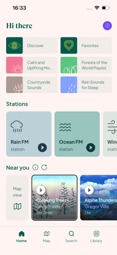
Finally, we added accessibility actions. Some elements, like a recording tile on the Home screen, contain a smaller button of their own, such as a play button. Actions let screen reader users reach that button straight from the tile, by picking ‘Play’ from a short list of options that the screen reader reads out.

Telling users what is happening
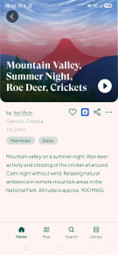
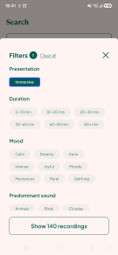
Reading out static content doesn’t always provide an optimal app experience. Sometimes, things happen dynamically during user interaction that should be announced in real time. For example, if a user adds a recording to their library, or downloads it, screen readers will announce this new, changed state. Similarly, any action that previously triggered a message to slide up from the bottom of the screen, such as ‘Profile updated’ or ‘Playlist deleted’, will also be announced. Other examples include the filters on the search screen: every time a new filter is applied or removed, the number of recordings matching the current filters will be announced.

Managing focus
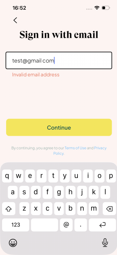
Screen readers don’t always prioritize the most relevant or important element on the screen: another opportunity for optimisation. On screens with multiple slides, such as the Earth.fm app onboarding screens, screen readers tend to focus on the most constant element – in this case, the ‘Next’ button. Therefore, we have ensured that the title of each slide is announced. Similarly, if a user types an invalid email address, the focus moves back to the input field to enable this to be corrected.
We have also made manual adjustments in the case of modals, pop-ups, and overlays, since screen readers often remain focused on the screen beneath these elements.
Nature Soundmap
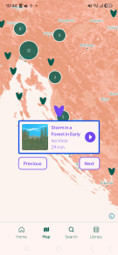
Earth.fm’s Nature Soundmap is an intrinsically visual feature, and relies on an external library that has no accessibility support. However, we have made all recording cards fully accessible, and added step buttons that allow screen-reader users to move from the current recording to the nearest recording on the map. Recording locations, normally only shown on the recording screen, are now also announced to clarify the area the user is exploring.
Audio player
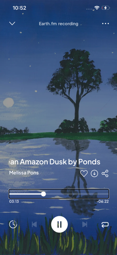
The audio player has both a collapsed and a full-screen view; we have ensured that screen readers focus on the correct view when users switch between them.
More challenging was the progress bar, which, for sighted users, is both clock and steering wheel, showing how far into a recording they are, and allowing them to jump to any other point. To make the bar accessible, we have added an announcement describing the amount of time elapsed in the current recording, and implemented support for swipe gestures: swiping up or down skips 30 seconds forward or back, replacing the dragging gesture that sighted users use.
Finally, we have ensured that, rather than stopping playback, screen reader announcements instead only temporarily reduce its volume – creating a more pleasant listening experience.
Sleep timer
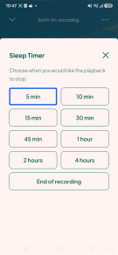
Our sleep timer previously used a wheel picker to set the amount of hours and minutes after which playback should stop. As this was not screen-reader compatible, we have replaced it with preset buttons such as ‘15 min’, ‘30 min’, and ‘1 hour’, which are read out and easy to interact with.
Additionally, we added a new feature: an option to activate the sleep timer when the current recording ends. This wasn’t compatible with the old wheel picker, but it was easy to add as a new preset button.
Let us know what you think
We hope that these improvements will make using the Earth.fm app a delightful experience for more people. If you are a screen reader, we would love to hear how you find the updated app, including any issues or further improvement you’d like to suggest. Let us know via our contact form! 📍
📍 To benefit from screen reader support, you will need to update the app to the latest version: 1.19.0. You can do this for Android in Google Play or for Apple in the App Store.
Earth.fm is a completely free streaming service of 1000+ nature sounds from around the world, offering natural soundscapes and guided meditations for people who wish to listen to nature, relax, and become more connected. Launched in 2022, Earth.fm is a non-profit and a 1% for the Planet Environmental Partner.
Check out our recordings of nature ambience from sound recordists and artists spanning the globe, our thematic playlists of immersive soundscapes and our Wind Is the Original Radio podcast.
You can join the Earth.fm family by signing up for our newsletter of weekly inspiration for your precious ears, or become a member to enjoy the extra Earth.fm features and goodies and support us on our mission.
Subscription fees contribute to growing our library of authentic nature sounds, research into topics like noise pollution and the connection between nature and mental wellbeing, as well as funding grants that support emerging nature sound recordists from underprivileged communities.

